PD Client and GDB (NL)
Manage all your NVWA declarations easily and error-free, automate processes and ensure full compliance within your supply chain.

Customs procedures in the air cargo zone at Brussels Airport are changing. In this article, we explain exactly what’s changing, how the new process works from arrival to clearance, and how Streamliner ensures that your goods continue to move smoothly through the system.
A new customs procedure is being introduced on Brucargo for the inbound flow between ground handlers and economic operators. Two new messages are central to this: the Transfer Message and the Deconsolidation Message. Together, they will eventually replace the familiar PLDA functionalities and the GCB lists.
On the customs side, both messages are directly linked to goods accounting. This means that every movement is automatically processed in the temporary storage inventory system, without any additional administrative work on your part. Within Streamliner, the messages also link to the RTO module, along with NCTS and IDMS, so that your own RTO inventory is automatically tracked as well.
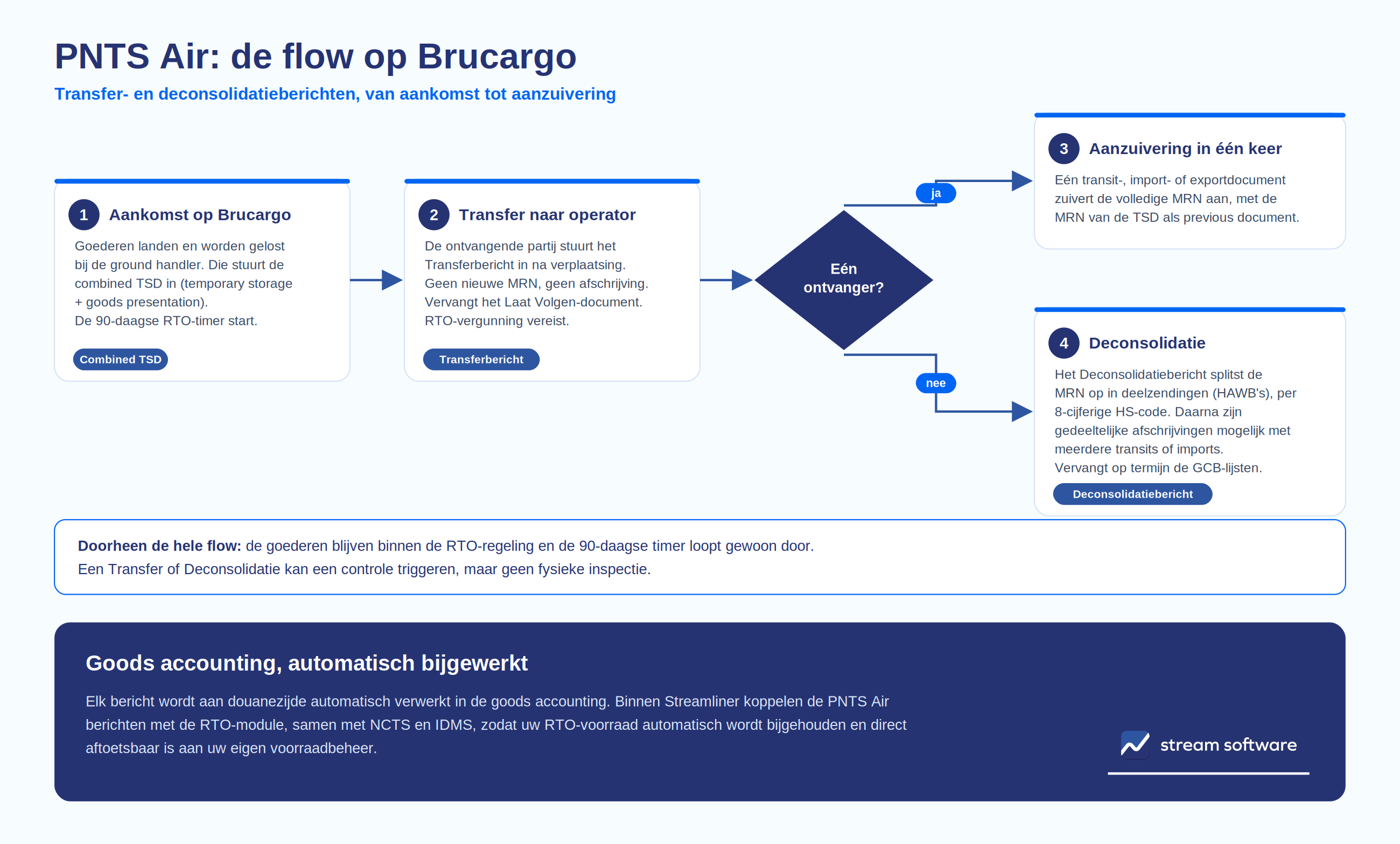
It all starts with the arrival of the goods. Your shipment arrives and is unloaded by the ground handler at Brucargo. The ground handler submits—as is already the case today—a combined TSD: the combined temporary storage declaration and the goods presentation notice. From that moment on, the 90-day period for temporary storage under the RTO scheme begins. So, up to this point, nothing changes in your current workflow.
If the goods are transferred from the ground handler to your own facility at the airport upon arrival, without a transit document being issued, then you, as the receiving party, must submit a Transfer Notice after the goods have actually been moved. An RTO permit is required for this notice.
Important to know: The goods remain within the RTO regime, and the 90-day timer—started by the ground handler’s combined TSD—continues to run. No new MRN is created. The Transfer is therefore not a write-off, but replaces the “Let Follow” document as proof of the movement. After the transfer, the new owner assumes responsibility for the goods and will automatically receive updates on the goods accounting going forward.
If the entire shipment is intended for a single recipient, the processing is particularly straightforward. You can clear the MRN from the TSD in a single step using a transit, import, or export document, specifying the MRN from the TSD as the “previous document.” One MRN, one message. Please note: the MRN must be cleared with a single message. If you wish to work with partial shipments, deconsolidation is required first.
If the MAWB covers multiple shipments for different parties, the Deconsolidation Message provides the solution. This message splits the MRN into separate partial shipments (HAWBs) based on an 8-digit HS code for each line item. This allows for partial write-offs and enables different parties to each prepare their own transit or import document.
The deconsolidation is recorded in customs’ goods accounting. The same rule applies here: the deconsolidation itself does not constitute a write-off of the combined TSD, so the RTO timer continues to run as usual. Eventually, this message will replace the GCB lists.
Every step in the process—from the combined TSD through the Transfer to Deconsolidation and final clearance—is automatically processed by customs in the goods accounting system. Within Streamliner, PNTS Air messages are linked to the RTO module, along with NCTS and IDMS. This ensures that your RTO inventory is automatically tracked and can be immediately reconciled with your own inventory management system at any time.
Good to Know
Both a transfer and a deconsolidation can trigger an audit, but not a physical inspection. Furthermore, because the RTO scheme remains in effect and no new MRN is generated, the compliance burden is significantly reduced. The messages also require only minimal information about the destination, which further reduces the administrative burden.

